


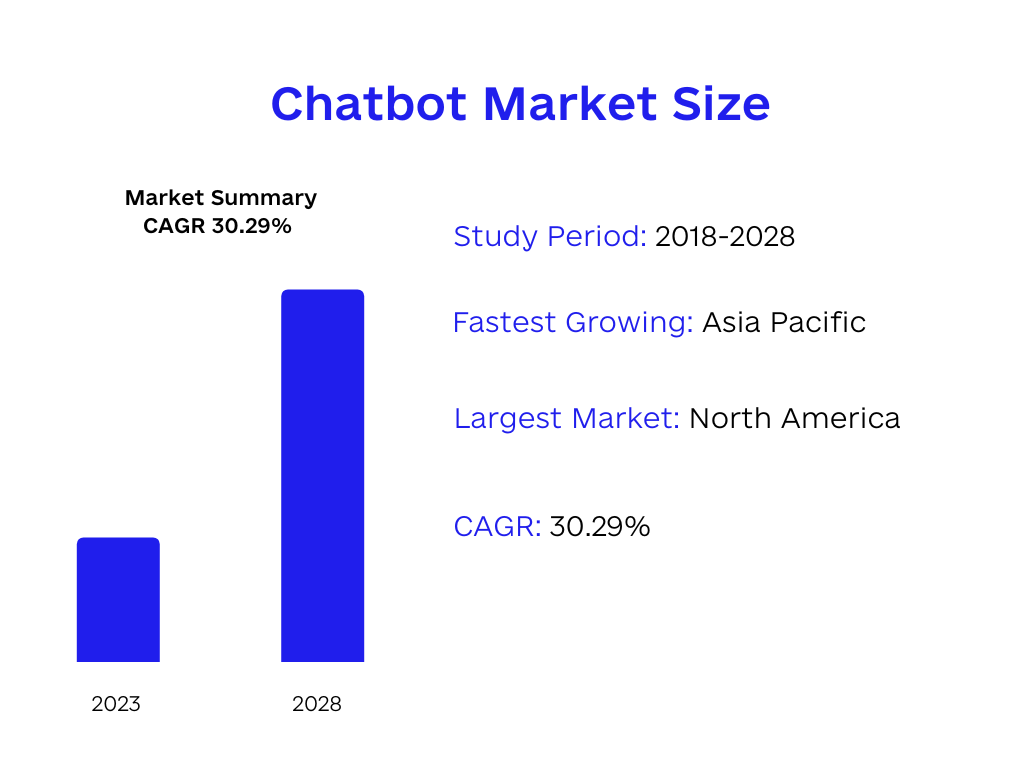
The chatbot market has seen remarkable growth, reaching USD 3.78 billion in 2021, with projections for it to continue expanding at a rapid rate of 30.29% until 2027. This upswing can be attributed to the widespread adoption of mobile and web messenger applications, coupled with the growing need for consumer analytics.
AI chatbots have the capacity to revolutionize numerous technical and business processes. For instance, by integrating ChatGPT into your app, users can experience seamless interactions that emulate natural conversations with another person. However, overcoming the complexities of integration and ensuring that the chatbot effectively addresses users’ needs can be challenging.
In this article, we will delve into all things ChatGPT, examining its capabilities, benefits, and the steps involved in incorporating it into your mobile or web applications. We’ll also discuss common challenges faced by developers and businesses while integrating chatbots and offer insights on how to overcome them.
Table of Contents
- 1 Understanding ChatGPT and Its Capabilities
- 2 How Does ChatGTP Classify Texts with Natural Language Processing?
- 3 ChatGPT’s Versatility: From Customer Support to Content Generation and Beyond
- 4 Benefits of Integrating ChatGPT into Your Mobile or Web Product
- 5 Integrating ChatGTP into a Mobile or Web Product: 3 Approaches That Work
- 6 Optimizing ChatGPT Integration: Tips for Success
- 7 Conclusion:
Understanding ChatGPT and Its Capabilities
ChatGPT is an advanced AI-powered tool that allows you to engage in conversations as if you were interacting with a real person. It’s like having a virtual companion ready to chat with you whenever you need it.
However, ChatGPT is more than just an ordinary chatbot. Its versatility enables it to answer a wide range of questions, from the mundane to the intricate. Even more impressively, it can assist with various tasks such as crafting emails, composing essays, and troubleshooting code!
Consider a situation where you’re facing difficulties debugging intricate code. ChatGPT can step in by taking your concerns and ideas, and then help you organize and present them in a coherent and effective way, simplifying the process of identifying and resolving issues within your code.
To illustrate this:
ChatGPT to the Rescue: 4 Debugging Examples
Example #1: Null Reference Exception
Faulty Code:
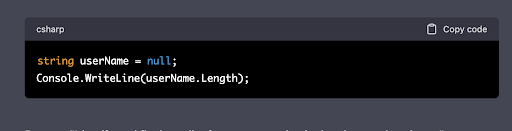
Prompt: “Identify and fix the null reference exception in the given code snippet.”
Fixed Code:
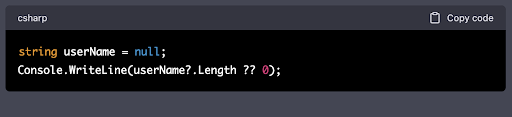
Explanation: In the initial code, we were trying to access the Length property of a null userName string, causing a null reference exception. In the fixed code, we use the null-conditional operator ?. to check if userName is null before accessing its Length property. If userName is null, the null-coalescing operator ?? returns 0 as the output.
Example #2: Incorrect Loop Condition
Faulty Code:
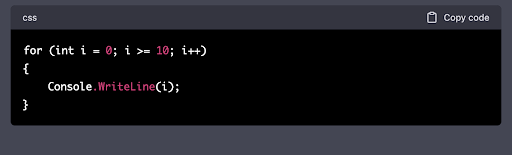
Prompt: “Find and fix the issue with the loop condition in the given code snippet.”
Fixed Code:
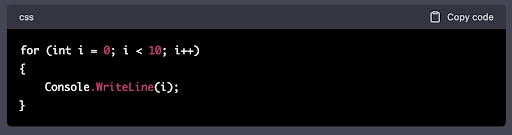
Explanation: The initial code had an incorrect loop condition (i >= 10), causing the loop to never execute. In the fixed code, we corrected the condition to i < 10, allowing the loop to execute and print numbers from 0 to 9.
Example #3: Off-by-One Error
Faulty Code:
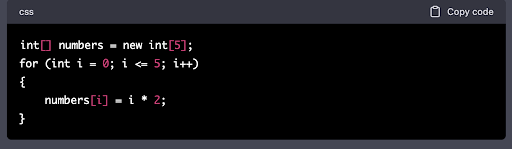
Prompt: “Identify and fix the off-by-one error in the given code snippet.”
Fixed Code:
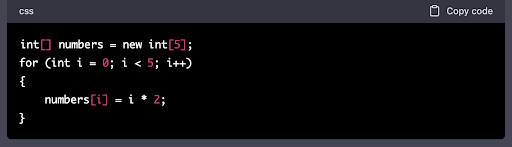
Explanation: The initial code contained an off-by-one error in the loop condition (i <= 5), causing an index out of bounds exception. In the fixed code, we changed the condition to i < 5, which prevents accessing an invalid index and correctly populates the array.
Example #4: Unhandled Exception
Faulty Code:
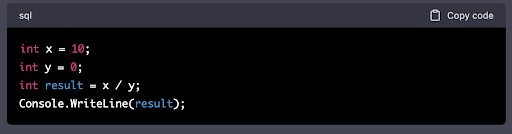
Prompt: “Find and fix the unhandled exception issue in the given code snippet.”
Fixed Code:
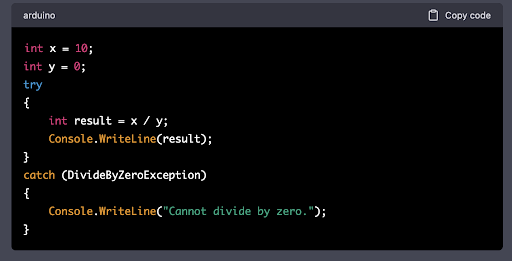
ChatGPT can also support developers in finalizing incomplete code.
Code Completion with ChatGPT
Here’s how it can assist you in completing unfinished code.
Case No. 1: Calculate the Factorial of a Number
Incomplete Code:
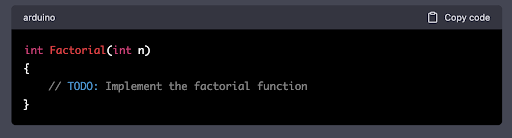
Prompt: “Complete the factorial function to calculate the factorial of a given number.”
Complete Code:
Case No. 2: Check If a String is a Palindrome
Incomplete Code:
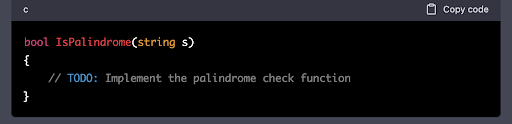
Prompt: “Complete the function to check if a given string is a palindrome.”
Complete Code:
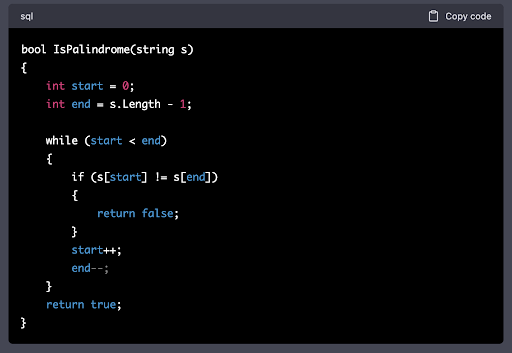
Case No. 3: Find the Maximum Value in an Array
Incomplete Code:
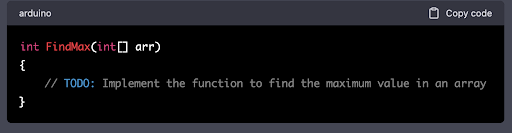
Prompt: “Complete the function to find the maximum value in a given integer array.”
Complete Code:
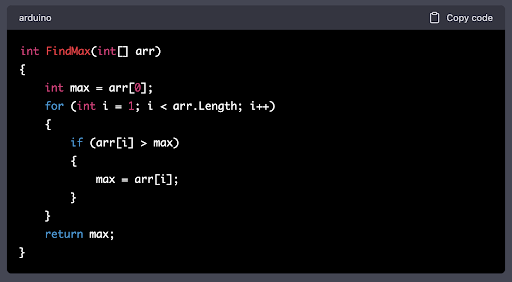
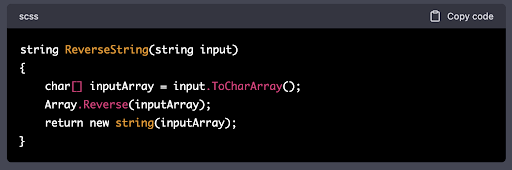
Case No. 4: Reverse a String
Incomplete Code:
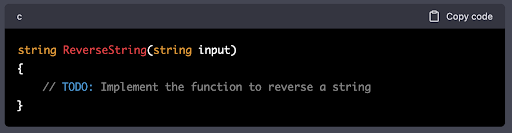
Prompt: “Complete the function to reverse a given string.”
Complete Code:
How Does ChatGTP Classify Texts with Natural Language Processing?
The natural language processing (NLP) market is expected to reach $43 billion by 2025. As a subfield of artificial intelligence (AI), NLP aims to enhance the ability of computers to understand and interact with human language, drawing from disciplines like computer science and computational linguistics to bridge the gap between human communication and machine comprehension.

ChatGPT utilizes Natural Language Processing (NLP) to classify texts by understanding and interpreting the meaning, context, and intent behind human language. NLP is a subfield of artificial intelligence that bridges the gap between human communication and computer understanding. Here’s a brief overview of how ChatGPT classifies texts using NLP:
Tokenization
The first step in processing text is breaking it down into smaller components called tokens. Tokenization helps the model identify individual words and punctuation marks, making it easier to analyze the text.
Text Preprocessing
This step involves cleaning and preparing the text for analysis. It may include tasks like converting text to lowercase, removing stop words (common words like ‘and’, ‘the’, ‘is’, etc.), and stemming or lemmatization (reducing words to their base or root form).
Feature Extraction
To make sense of the text, ChatGPT needs to convert it into a numerical format. Techniques such as word embeddings, term frequency-inverse document frequency (TF-IDF), or bag-of-words are used to transform the text into a structured format that the model can understand.
Language Modeling
ChatGPT is based on the GPT (Generative Pre-trained Transformer) architecture, which is a type of transformer model. It uses self-attention mechanisms to capture context and relationships among words in the text. The model is pretrained on a massive corpus of text data and fine-tuned for specific tasks, such as classification or text generation.
Classification
Once the text has been processed and features have been extracted, ChatGPT uses the learned patterns and relationships to classify the input text. It can identify categories, sentiments, or topics based on the training it has received.
Post-processing
The model’s output is then processed and presented in a human-readable format, providing the final classification result.
ChatGPT’s Versatility: From Customer Support to Content Generation and Beyond
AI chatbots like ChatGPT are becoming increasingly intelligent and versatile, finding their way into nearly every industry, from e-commerce to healthcare. Let’s explore different use cases for ChatGPT integration across industries.
Customer Service
Implementing messaging bots can help businesses provide instant service to their customers. They can handle a wide range of tasks, such as answering questions, addressing complaints, and collecting feedback. Furthermore, they can inform customers about products and services. The best part? AI assistants can be set up to handle common queries automatically, saving businesses time and money.
Education
Virtual assistants can greatly enhance the learning experience by providing personalized and engaging assistance. Whether students are struggling with homework, finding topics too complex, or need help preparing for exams, they can act as a personal tutor that explains concepts in a clear and understandable way. Additionally, virtual assistants can support teachers by grading papers, creating lesson plans, and providing feedback.
Fitness and Healthcare
The healthcare sector can leverage digital assistants like ChatGTP to offer personalized health advice. They can provide basic health guidance, track symptoms, and help with prescription reminders. Chat agents can also contribute to mental health care by engaging with patients and providing them with relevant resources.
Marketing and Content Creation
Interactive agents have the ability to create content, offering writing, editing, and proofreading assistance. Businesses can save time and resources by utilizing such chat agents to produce original content based on user input. Interactive agents can also be employed in marketing to communicate with consumers and deliver relevant information. Businesses can rely on ChatGPT to create customized marketing campaigns tailored to the preferences and behavior of their target audience.
Virtual Assistance
ChatGPT can function as a digital assistant, helping with daily activities, scheduling appointments, and sending reminders. Moreover, chatbots can be designed to interact with other devices, such as smart home appliances and virtual reality headsets.
News, Media, and Information
In the media and news sectors, automated conversational systems can deliver personalized news updates and notifications. Users can receive news and information tailored to their preferences, location, and interests. They can provide information on events, weather, and traffic. Publishers can use ChatGPT to create customized news feeds for their users.
Benefits of Integrating ChatGPT into Your Mobile or Web Product
Here are the advantages of building ChatGPT into mobile and web applications
Enhanced User Experience and 24/7 Support
Integrating ChatGPT into mobile or web products can significantly improve the user experience, offering round-the-clock support and increased app usability. This powerful tool enables developers to create intelligent chatbots using natural language processing capabilities, leading to improved customer engagement and higher productivity.
Rapid Development and Experimentation
Incorporating ChatGPT into app development can reduce development times by allowing for quick iterations and experimentation with various conversational flows. Developers can also leverage ChatGPT to enable voice-activated applications and multimodal interactions, providing a more intuitive and interactive user experience.
Personalized Conversations
ChatGPT allows mobile app developers to tailor discussions based on users’ preferences or previous interactions, delivering highly customized solutions for each user.
Data-Driven Insights and Streamlined Interactions
By integrating ChatGPT into an application, developers can gain valuable analytics insights to better understand their users’ needs, manage repetitive tasks, and streamline interactions with users.
Integrating ChatGTP into a Mobile or Web Product: 3 Approaches That Work
Integrating ChatGPT can be done in various ways. We’ll examine three approaches worth considering: custom implementation, API integration, and using a chatbot builder platform.
Custom Implementation: Tailored to Your Business Needs
Opting for custom implementation involves building your chatbot from scratch and adding API integration. This approach is typically the most challenging, requiring considerable technical knowledge and resources. Businesses must develop code connecting with the ChatGPT API and establish a system to handle user input and generate appropriate responses.
However, custom ChatGPT integration offers the most freedom to create a chatbot tailored specifically to your business needs, enabling you to design responses and workflows precisely. Keep in mind that the custom integration process can be complex and time-consuming, requiring ongoing maintenance and updates.
API Integration: A Simple Solution
API integration is one of the easiest methods for incorporating ChatGPT into your mobile or web application. APIs provide ready-made solutions that easily connect to your project without starting from scratch. They are ideal for businesses looking to add chatbots without investing significant time or money.
The trade-off with APIs is the limited flexibility for customization, as you’re mainly creating an interface for users to chat with the bot directly within your app.
Chatbot Builder Platform: Convenience and Ease of Use
Using a chatbot builder platform is another convenient option for integrating ChatGPT into your mobile or web app. These platforms offer pre-built tools and interfaces for creating chatbots, along with ChatGPT integrations. Chatbot builders often provide tiered pricing based on subscriptions, allowing businesses to select a plan suitable for their budget and usage.
However, customization possibilities may be limited by the platform itself, restricting response options and integrations. Chatbot builders like Tars, Chatfuel, and Landbot are excellent options for business owners with limited time and budget seeking to add ChatGPT to their mobile or web app, although customization might be somewhat restricted.
Optimizing ChatGPT Integration: Tips for Success
Integrating ChatGPT into your mobile or web product can bring numerous benefits, but it’s essential to follow best practices for a seamless and secure implementation. Here’s a rundown of key considerations to ensure effective and safe ChatGPT integration:
Protect User Privacy and Data Security
User privacy and data security are paramount when implementing ChatGPT. To safeguard users’ data, start by utilizing secure communication channels, such as HTTPS, to encrypt data exchanges between user devices and the ChatGPT server. This prevents unauthorized interception or manipulation of data in transit.
Obtain explicit user consent for data usage and ensure transparency about how their data will be utilized. Limit data collection, securely store sensitive information using industry-standard encryption, and enforce strict access controls. When using user data to train ChatGPT models, anonymize and aggregate the data to protect individual privacy.
Regularly review and update privacy policies and security practices, including conducting security audits and monitoring for suspicious activity.
Prepare for Errors and Fallbacks
Errors can occur at any stage of integration, so it’s crucial to have contingency plans. Implement fallback systems to maintain a seamless user experience during errors. Provide clear, informative error messages to help users understand and resolve issues.
Continuously monitor and test for errors, using automated tools or manual checks, to promptly identify and address issues before they affect user experience.
Manage User Expectations
Setting appropriate expectations for users when integrating ChatGPT is essential for their satisfaction. Follow these tips to manage user expectations effectively:
- Clarify technology limitations: Inform users about what ChatGPT can and cannot do to avoid disappointment.
- Offer usage examples: Provide examples to demonstrate ChatGPT’s capabilities and potential use cases.
- Encourage specificity: Prompt users to ask specific questions or provide detailed input for better results.
- Establish response time expectations: Clearly communicate anticipated response times to manage user patience.
- Provide alternative support options: Offer alternative methods for users to seek help if ChatGPT doesn’t fulfill their needs.
Conclusion:
Integrating ChatGPT into your mobile or web applications can be a game-changer, offering personalized recommendations, predictive analytics, and natural language conversations that enhance user experience.
Code&Care focuses on understanding your vision and requirements in order to create a solution that truly leverages ChatGPT’s capabilities. Our expertise in custom software development enables us to provide the ideal partnership for those looking to harness generative AI technology.
If you want a customized approach to integrate ChatGPT into your mobile and web solutions, connect with us, and let’s begin.















No comments yet.
Give us your impression about this article.